Turn first-time visitors into committed members — without losing anyone in a stack of connect cards or a spreadsheet.
Visitors check in with a QR code, and TracFlock reminds you who still needs a call — so nobody who was ready to come back gets forgotten. Members, groups, attendance and giving live in the same place.
Takes about a minute. Send us your member list — even a PDF — and we'll import it for you, free.
"Nobody falls through the cracks anymore." — Pastor Shaw, West End Church
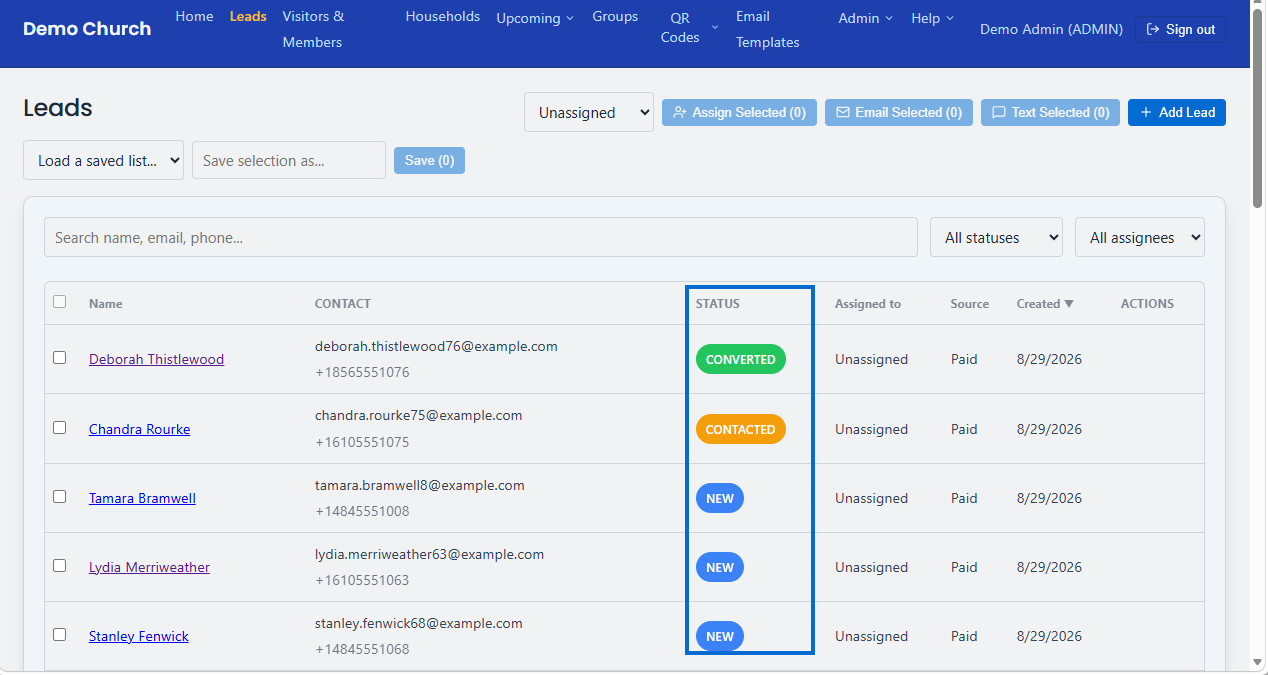
Everything your front door needs, in one place
Most churches track visitors in three different tools that don't talk to each other. TracFlock replaces all of them.
Lead → Visitor → Member pipeline
Every walk-in, form fill, or referral starts as a lead. Move them through your pipeline and convert to a Visitor or Member with one click — no re-typing their info.
Online & QR giving
Connect your own Stripe account and accept online or QR-code giving, tied to events and each person's giving history — no separate giving platform to reconcile.
Year-end giving statements
Print a tax-ready giving statement for any donor, or every donor at once — itemized gifts, your church's tax ID, and the required disclosure language (IRS rules in the US, CRA rules in Canada), no spreadsheet required.
Order of service planning
Build a run-of-show for any event: reorder tasks, assign a person and a time to each one, attach a playable song or a lyrics sheet, and print a clean copy for the team.
Attendance & QR check-in
Print one QR code for walk-ins to scan. TracFlock recognizes returning visitors automatically instead of creating a duplicate person every Sunday.
Automatic follow-up emails
TracFlock follows up for you: a welcome note a week after someone's first visit, an invitation to new leads, and a "We Miss You" when a regular misses a couple of services. Review each email before it goes out, or let them send on their own. Included on Starter and Growth — every plan can send the same built-in templates by hand.
Two-way texting & WhatsApp
Text leads and members straight from TracFlock, and their replies land right back in the same activity timeline as everything else on their record — opt-in consent and STOP opt-out handling are built in, not something you configure yourself. Churches in the Caribbean, Kenya, Nigeria, Ghana, South Africa, Uganda, Australia, New Zealand and the Philippines message people on WhatsApp instead.
Every reply in one place
Email, text and WhatsApp replies from the last two weeks show up right on your Home dashboard, newest first, so no one's response slips through the cracks. Filter by texts or emails, and jump straight to the person's record to follow up. Reps only see replies from the people assigned to them.
Member feedback with AI summaries
Members rate your church, groups, and events from the portal and share what's working and what could be better, anonymously if they prefer. See the ratings at a glance on your dashboard, and let AI summarize the common themes in one click. Included on Starter and Growth.
Groups & events
Organize small groups, assign leaders and volunteers to events, and track RSVPs — all tied back to the same people record, not a separate spreadsheet.
Event sign-ups & tickets
Give any event its own sign-up page to share on Facebook, by text, or as a printed QR code. Everyone new who signs up lands in your pipeline as a lead, with a confirmation and a reminder the day before. On Starter and Growth, add spot limits with a waitlist, your own sign-up questions, reminder texts, thank-you emails afterward, and paid tickets with QR check-in at the door.
CSV import, no duplicates
Bring your existing spreadsheet in with the built-in importer. Re-importing the same file won't create duplicate leads or people — TracFlock checks first.
Announcements
Post a date, a description, and an optional photo — recurring weekly ones stick around until you remove them, everything else clears itself out once it's past. Every announcement shows up automatically on your church's self-service portal.
Built-in Getting Started Guide
New and smaller churches see a plain-language, step-by-step walkthrough pop up automatically — big text, big buttons, no jargon. Any church can open it anytime from the Help menu, plus schedule a live demo if they get stuck.
See it in action
Two minutes each, no narration needed — just what your visitors and staff actually see.
Walk-In QR check-in
Scan the code, answer one question, done — TracFlock recognizes a returning visitor automatically and never creates a duplicate.
Importing leads from a CSV
Bring in your existing spreadsheet in one pass — TracFlock previews new vs. duplicate rows before anything is written.
Following up with members & visitors
See who hasn't been around, select them, and send a follow-up email straight from a built-in template — no spreadsheet, no guesswork.
One pipeline, from first hello to committed member
This is the exact workflow TracFlock is built around — see the full walkthrough in the Help Center.
Add the lead
Someone visits, fills out a form, or gets referred — they're added as a Lead with a name and however you reached them.
Convert to Visitor
Once they've actually shown up, convert the Lead to a Visitor with one click. Their contact history moves with them.
Convert to Member
When they're ready to commit, promote the Visitor to a Member — no re-entering information, no losing their attendance history.
Assign to a Group
Get them connected right away by adding them to a small group, so membership isn't the finish line — it's the start of belonging.
“Before, a visitor's name went in a notebook and mostly stayed there. Now every visitor moves through the same pipeline — first contact, follow-up, member — and nobody falls through the cracks because they weren't written down twice. If someone hasn't been back in a couple of weeks, the system tells us before we notice ourselves.”

Pastor Shaw, West End Church
Simple, transparent pricing
No per-transaction markups on your plan, no setup fees. Pay for the size of your church, not a bundle of features you don't need.
All prices in USD.
Basic
Up to 75 people
- Full lead & people pipeline
- QR check-in & attendance
- Groups & events
- Event sign-up pages
- Built-in email templates
- Email replies on your dashboard
- Online & QR giving
- CSV import
- Multiple staff accounts
30-day free trial · no credit card
Starter
Up to 250 people
- Everything in Basic
- Two-way texting or WhatsApp (250/mo)
- Automated follow-up emails
- Text & WhatsApp replies on your dashboard
- Member feedback & AI summaries
- Group self-service & leader tools
- Event waitlists, questions & reminder texts
- Paid event tickets & QR check-in
30-day free trial · no credit card
Growth
Unlimited people
- Everything in Starter
- No people limit, ever
- Unlimited texting, or 1,000 WhatsApp messages/mo
- Priced for growing churches
30-day free trial · no credit card
Every church starts with a 30-day free trial — no credit card required. Choose a plan any time from your billing settings, no sales call required.
Texting is for churches in the US and Canada. Churches in the Caribbean, Kenya, Nigeria, Ghana, South Africa, Uganda, Australia, New Zealand and the Philippines get WhatsApp instead: 250 messages a month on Starter and 1,000 on Growth (500 in the Caribbean). Texting and WhatsApp aren't included on Basic or the free trial.
FAQs/Common Questions
How much does TracFlock cost?
Basic is $19.99/mo for up to 75 people, Starter is $39.99/mo for up to 250 people, and Growth is $69.99/mo for unlimited people. Every church starts with a 30-day free trial — no credit card required.
Can I text visitors and members from TracFlock?
Yes. Send texts to leads or people straight from TracFlock, and their replies show up automatically in the same activity timeline as everything else on their record. Opt-in consent and STOP opt-out handling are built in. Texting is for churches in the US and Canada, and is included on the Starter plan (250 texts/month) and Growth plan (unlimited); it isn't included on Basic or the free trial. Churches in the Caribbean, Kenya, Nigeria, Ghana, South Africa, Uganda, Australia, New Zealand and the Philippines use WhatsApp instead.
Can churches outside the US and Canada message people on WhatsApp?
Yes. Churches in the Caribbean, Kenya, Nigeria, Ghana, South Africa, Uganda, Australia, New Zealand and the Philippines can send WhatsApp messages to leads and people straight from TracFlock, and replies land in the same activity timeline and on the Home dashboard. Pick one of TracFlock's ready-made welcome, follow-up and reminder messages any time, or write your own words within 24 hours of the person's last message. WhatsApp consent and STOP opt-out are built in. WhatsApp is included on the Starter plan (250 messages/month) and Growth plan (1,000 messages/month, or 500 in the Caribbean); it isn't included on Basic or the free trial.
Where do I see replies to my emails and texts?
Right on your Home dashboard. The Replies card shows every email and text reply from the last two weeks, newest first, with the person's name one click away from their full record. Each reply is also saved to that person's activity timeline. Reps only see replies from the people assigned to them.
Can members give feedback on our church, groups, and events?
Yes. From your church's self-service portal, members can rate the church, a group, or an event as below, meeting, or exceeding expectations, and share what's working well, what could be better, and what they didn't like, anonymously if they prefer. Your Home dashboard shows the ratings at a glance, and once enough comments come in, one click creates an AI summary of the common themes. Feedback is included on the Starter and Growth plans, and you can turn it off anytime in Church Settings.
Can I import our existing visitor and member list?
Yes — the built-in CSV importer handles both leads and people, and automatically detects duplicates so re-importing the same file won't create copies.
Do you support online giving?
Yes. Connect your own Stripe account and accept online or QR-code giving, tied to events and each person's giving history.
Can people sign up for our events online?
Yes, on every plan. Turn on online sign-up for any event and TracFlock gives it a shareable page and QR code. People sign up in seconds from their phone and get a confirmation email and a reminder the day before, and anyone new is added as a lead so you can follow up. Starter and Growth add spot limits with a waitlist, custom sign-up questions, reminder texts, and thank-you or we-missed-you emails after the event.
Can we sell tickets to events?
Yes, on Starter and Growth. Set a ticket price and people pay through your church's own Stripe account, the same one used for online giving. Each buyer gets a ticket with a QR code, and your team checks people in by scanning it with a phone. Admins can refund a ticket in one click.
Can I give donors a year-end statement for taxes?
Yes — under Admin → Giving, pick a year and print an itemized statement for any donor, or every donor at once. Each statement includes your church's name, address, and tax ID, the donor's gifts for that year, and the disclosure language required for tax-deductible contributions (IRS rules in the US, CRA rules in Canada).
Is there a contract or setup fee?
No. TracFlock is month-to-month with no setup fees. Cancel anytime from your billing settings.
Is our church's data safe with TracFlock?
Yes. All traffic is encrypted (HTTPS), passwords are never stored in readable form, and login attempts are protected against automated guessing.
Can other churches, or staff who shouldn't have access, see our data?
No. Every church's records are kept completely separate from every other church on the platform, and staff only see what their role allows — so you control who can access things like giving records or account settings.
Do you store our members' credit card numbers?
No. Online giving and subscription billing both run through Stripe, a PCI-compliant payment processor. Card details are entered directly on Stripe's own secure page — TracFlock's servers never see or store card numbers.
Do you sell or share our data?
No. We don't sell contact information or use it for advertising. It's only shared with the vendors needed to run the service itself, like our payment processor, and they're bound to protect it.
Can I plan a service's order of service (run of show)?
Yes — build a reorderable list of tasks for any event, assign a person and a time to each one, attach a playable song or lyrics sheet, and print a clean copy for your team.
Can I post announcements for the congregation to see?
Yes — post a date, description, and an optional photo, and mark it recurring weekly if it happens every week. Announcements show up automatically on your church's self-service portal, and non-recurring ones clear themselves out once their date has passed.
Is there help for churches that are new to this kind of software?
Yes — churches with fewer than 15 people see a built-in, plain-language Getting Started Guide pop up automatically the first time they log in, with extra-large text and buttons and no jargon. It walks through adding people, importing an existing list, and following up. Every church, regardless of size, can open it anytime from the Help menu, and can schedule a live demo if they get stuck.
Where do I learn how to use it?
The Help Center walks through the full workflow — adding leads, converting them to visitors and members, and assigning people to groups — plus every other feature.
Stop losing visitors in a stack of connect cards or a spreadsheet.
Set up your church in a few minutes. 30-day free trial, no credit card required.